Email for AI agents.
Kept on your machine.
Give every agent its own inbox on your domain. Mail waits in the cloud only as ciphertext, lives in an encrypted database on your computer, and leaves only when its rules allow.
- Mail arrivesCloudflare receives it for your domain.
- Sealed at the edgeAn Email Worker encrypts it to your key with age.
- Waits as ciphertextR2 holds it until your machine is online.
- Opened at homeInbot decrypts it into an encrypted local database.
- Read by your agentThrough MCP, the CLI or REST, within its grant.
- Reply, with approvalIf the grant asks for approval, you decide before it leaves.
Install, then make it yours
One self-contained download with its own runtime. Finish setup in the browser, then let it run in the background. No Docker, no database server.
Follow the quickstart$ curl -fsSL https://inbot.kerd.dev/install.sh | sh
$ inbot serve --init --port 8025Complete setup in the browser, stop the foreground process with Ctrl-C, then run inbot service install. Verify the installed version with inbot --version.
On Windows 11 x64 or ARM64, use the PowerShell command in the install guide.
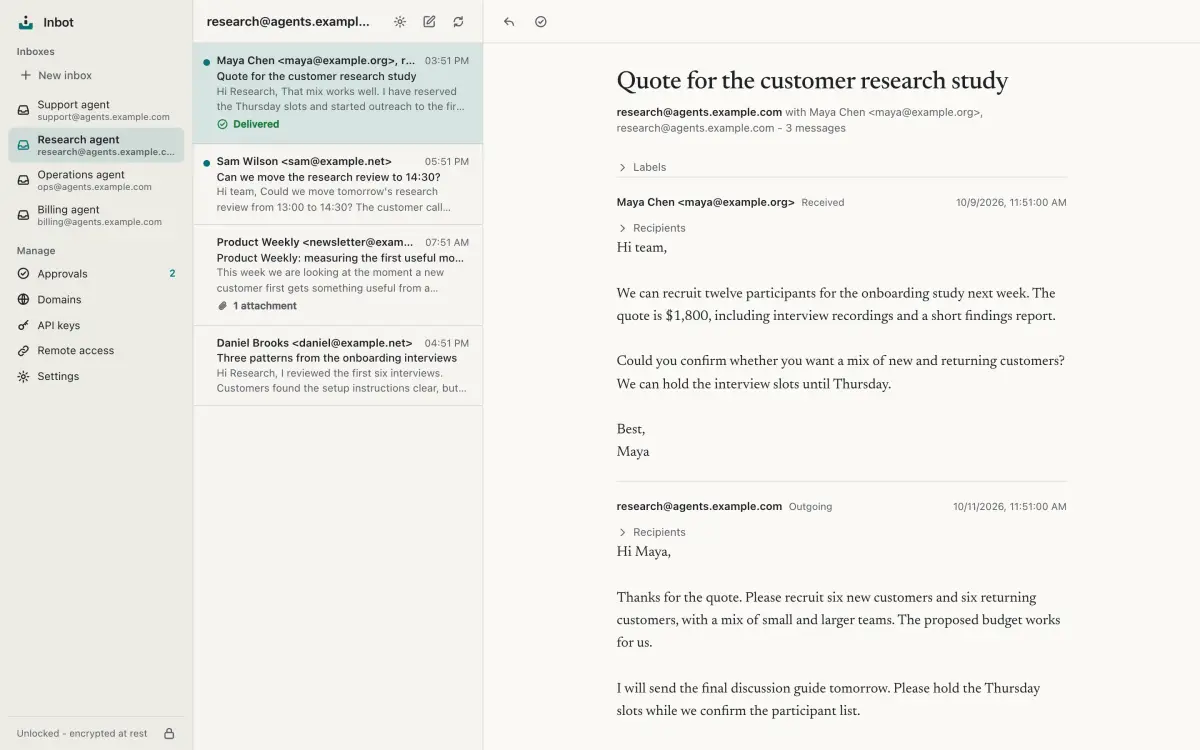
Every agent gets an inbox
Real addresses on your own domain, like research@agents.example.com. You see every thread, every draft and every reply from one owner app.
One contract, every surface
MCP, the CLI and the REST API call the same service methods with the same permission checks. Pick whatever your agent speaks.
Browse the MCP toolsreply_to_message({
inboxId: "research@agents.example.com",
messageId: "<CAF7k2@mail.example.org>",
text: "Thanks, the quote works for us.",
idempotencyKey: "reply-quote-1"
})$ inbot messages reply research@agents.example.com \
'<CAF7k2@mail.example.org>' \
--text 'Thanks, the quote works for us.' \
--idempotency-key reply-quote-1POST /v0/inboxes/research@agents.example.com/messages/%3CCAF7k2%40mail.example.org%3E/reply
Authorization: Bearer inbot_...
Idempotency-Key: reply-quote-1
{ "text": "Thanks, the quote works for us." }{ message_id, thread_id }with direct sending: same result, same permission check, queued in the same outbox. Approval grants return approval_required and create a pending draft.Ciphertext until it is home
An Email Worker in your Cloudflare account encrypts each message to your key before anything is stored. Only your machine can open it. Cloudflare still sees mail in transit, so this is privacy at rest, not end-to-end encryption.
Read the security modelage-encryption.org/v1 -> X25519 tC4r1yQ0m2aV8nEw5Lz Kp3ZfQ0uVd7sHnXc2RbW9eGmTq --- 8VbEo1sJxKwq4ZyD u9F2c#qL0v>e7Wm!rA4tZp1Ks8 nG3x/Q6hY0b+Jd5wR9mVc2Ee7T Lq4@zF8sN1oX3kP6yH0aU5gMi9
- From
- Maya Chen <maya@example.org>
- To
- research@agents.example.com
- Subject
- Quote for the October batch
Hi, attached is our quote for the October batch. Prices hold until the 24th.
You decide what agents send
Every key carries a send policy that the service enforces, whatever the agent was told by a message it read.
How approvals workagentsend_messagequeuedin the outboxsentaccepted by Cloudflaredeliveredreported back
Mail is queued without owner approval. Sent means Cloudflare accepted it; delivered needs a separate report. Allow and block lists still apply.
agentsend_message403approval_requiredyouapprove or rejectqueuedthen sent
The send becomes a draft in your Approvals queue. Nothing leaves until you approve it.
agentsend_message403missing_permission
The agent can read its inbox but cannot send, reply or forward.
Reach it from the cloud
Turn on remote access and Inbot creates a Cloudflare Tunnel to your machine. Cloud agents connect with OAuth and get only the routes they need.
Set up remote access- No open ports. The tunnel dials out from your machine.
- Restricted routes. Agents get MCP and scoped API routes. Owner sign-in, approvals and OAuth consent are available; local management stays local.
- Revocable. Remove a grant and the agent loses access at once.